


The ever-evolving age of technology has transformed learning experiences, giving rise to new platforms such as Google Classroom, Moodle, Canvas and more for students across the country.
George Mills thought about how students could personalize their learning experiences on these platforms; with that, BetterCanvas was created.
BetterCanvas is a Canvas enhancement tool students can use through a browser extension, accessible to Google Chrome or Mozilla Firefox. It includes modern features such as card customization, card assignments, dark mode, themes, to-do lists and a GPA calculator.
The idea for BetterCanvas emerged during the COVID-19 pandemic, when schools had to continue the year virtually. Mills, a high school student at the time, said he felt the learning environment was sterile and impersonal, so he gradually incorporated his coding skills to add comforting features. He continued this hobby through his college career.
In 2024, BetterCanvas gained popularity on TikTok, with users sharing their customizations and productivity setups, resulting in a significant increase in downloads from thousands to millions.
This TikTok phenomenon caught the attention of product strategy and scaling educational technology expert Jake Silver, who partnered with Mills to develop the comprehensive platform used today.
To install, students can download the extension on https://www.bettercanvas.org/ or they can follow these steps:
- Search “BetterCanvas (now BetterCampus)” in your preferred web store
- Install
- Open your preferred browser and confirm the installation
- Open Canvas, click your extension link and enjoy personalizing your learning experience
Once the BetterCanvas extension is installed, you can access it by clicking on the puzzle piece icon next to the search bar.
BetterCanvas enables users to customize the educational platform or use presets from other users.
If you’re looking for inspiration or a theme that you can use for your Canvas this semester, consider these designs below.
Fashionista Kitties
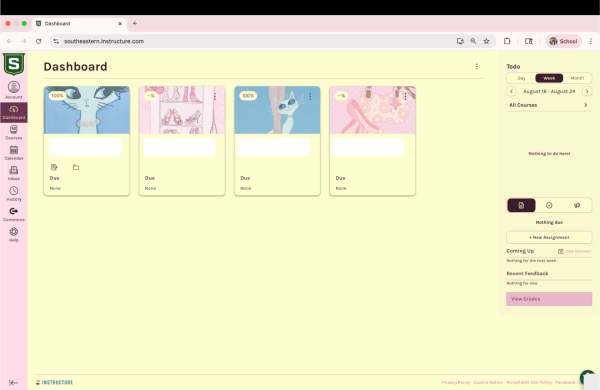
Image Addresses:
- Image 1: https://i.pinimg.com/736x/37/3c/17/373c171acb7a0c668ed1c7f32fd11e53.jpg
- Image 2: https://i.pinimg.com/736x/a1/a5/71/a1a571ec8d94707fbca1f2f0052db5ed.jpg
- Image 3: https://i.pinimg.com/736x/44/02/16/4402169dfb31bf025c646576af17062f.jpg
- Image 4: https://i.pinimg.com/736x/88/ce/4a/88ce4a14232b0f7c3c5c7441497a40d5.jpg
Chic Dogs
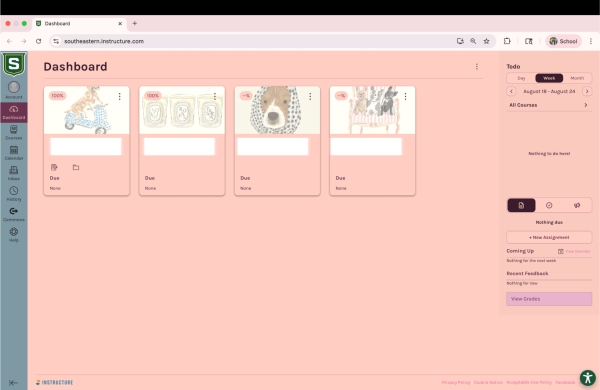
Hex Color Codes: Cadet Gray (#7D99A3) and Melon (#FFCDC1)
Image Addresses:
- Image 1: https://i.pinimg.com/736x/83/96/f3/8396f3263aa8f44afb98257adf0cdfb5.jpg
- Image 2: https://i.pinimg.com/736x/f0/a7/14/f0a714c316b06ff2a10670fb86f3d2d6.jpg
- Image 3: https://i.pinimg.com/736x/f8/80/61/f880614e868758ad6d43802e5639ebdd.jpg
- Image 4: https://i.pinimg.com/1200x/e9/59/f0/e959f03b776b2841d036e31a33e6770e.jpg
Lion Pride
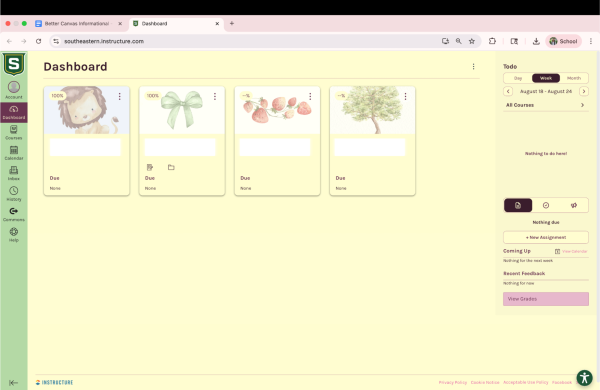
Hex Color Codes: Very Pale Yellow (#FFFDD1) and Very Soft Green (#B3D9A5)
Image Addresses:
- Image 1: https://i.pinimg.com/736x/3b/2e/27/3b2e27d0ce1f0b2c6171947630ec0e87.jpg
- Image 2: https://i.pinimg.com/736x/6a/2f/ea/6a2fea2ad8aeaa224156cf86ec12c11f.jpg
- Image 3: https://i.pinimg.com/736x/a3/b0/36/a3b0362fb2ee4eb9d9e8db2b50e9d4b1.jpg
- Image 4: https://i.pinimg.com/736x/03/05/5e/03055e43a4db434135c4529a2b3b71f0.jpg
To input these hex color codes and image addresses, simply click on the BetterCanvas extension, click “Dark Mode” to change the background colors and click “Cards” to add the image addresses.

**Disclaimer: All artwork used in the above templates is not owned by The Lion’s Roar and was found on www.pinterest.com.**